
If you need assistance, our Helpdesk team is always ready to help. This article explains how to contact us.
A. Directly from your SupportPay account:
1. When logged in, you can click on the Help button at the bottom left of the page.

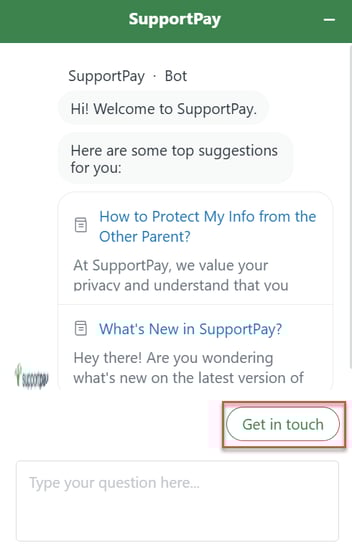
2. After you click on it, you'll see a pop-up window where you can start chatting with our chatbot, which can answer your questions and suggest help center articles based on your inquiries. However, if you need assitance from one of our Support agents, click on Get In Touch.
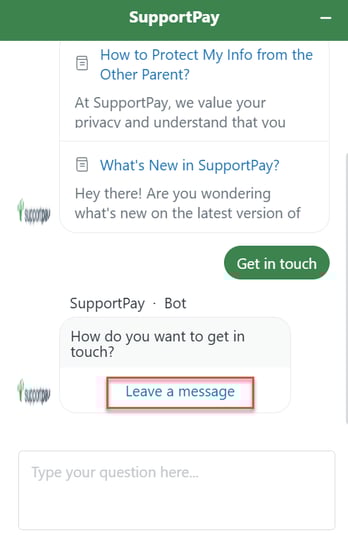
3. Then, click on the Leave a message button.
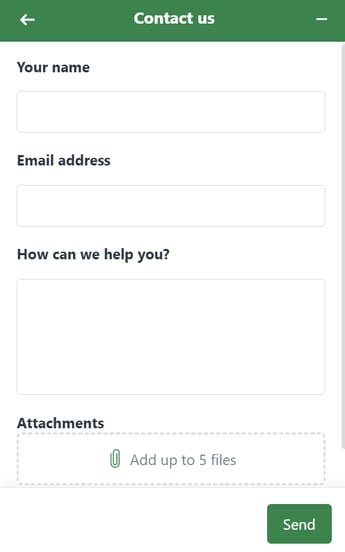
4. Last but not least, enter your contact information and your inquiry, so that one of our support agents get in touch as soon as possible. Pro Tip: From this window, you can attach screenshots to better describe the issue you're experiencing.
B. Send us an email!
You can directly contact us by sending us an email at help@supportpay.com. This will also open a support request, and we'll get back to you within 24-48 hours.
C. Book a Support Meeting with us:
If you prefer to speak with one of our Helpdesk specialists face-to-face, you can schedule a support meeting with us at supportpay.com/customer-meeting. Once you schedule your meeting, you will get link via email to join the meeting at the time you select.
Please feel free to contact us in any of the ways described above. We're always ready to help you with your inquiries!